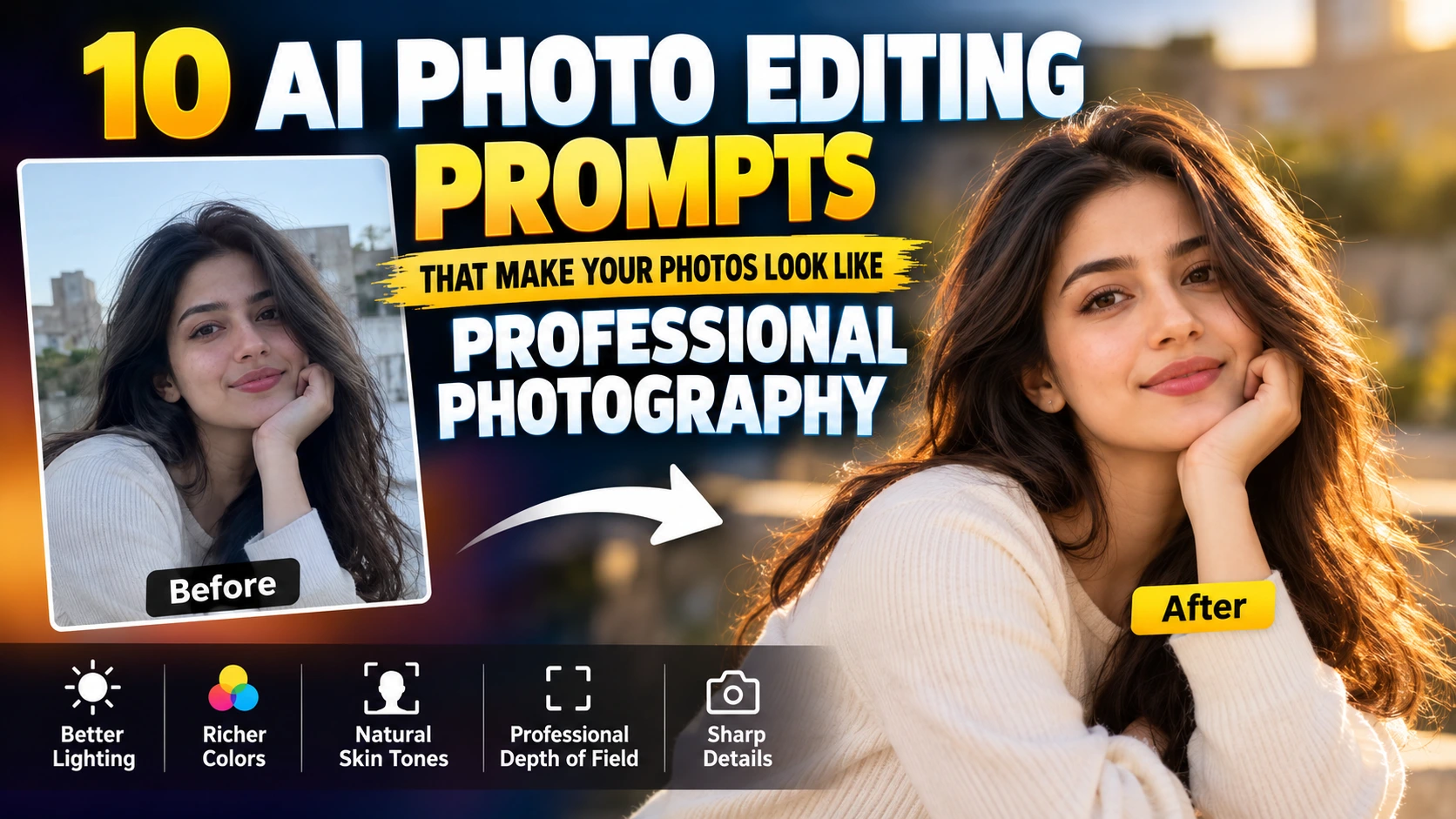
Want to make your ordinary photographs look like they were captured by a professional photographer? With the right AI photo editing prompt, you can improve lighting, colors, skin tones, sharpness, background blur, depth, and overall image quality without spending hours in Photoshop.
In this guide, PromptViz.online brings you 10 copy-ready AI photo editing prompts that can help you create professional-looking portraits, cinematic photographs, studio photos, fashion images, outdoor portraits, and social media pictures. Simply upload your photograph to an AI image editor, copy one of the prompts below, paste it into the editor, and generate your result.
Image caption: AI photo editing can transform an ordinary photograph into a professional-looking portrait.
Suggested ALT text: AI photo editing before and after professional portrait
Why AI Prompts Matter for Photo Editing
AI photo editors can make significant changes to photographs, but the quality of the result depends heavily on the instructions you provide.
For example, instead of writing:
“Make this photo better.”
You can provide detailed instructions about lighting, colors, skin texture, depth of field, camera style, and the details that must remain unchanged.
A detailed prompt gives the AI a clearer understanding of the result you want.
- Before You Start
- For better results, start with a high-quality photograph.
- Use these simple tips:
- Use the highest-resolution original image available.
- Avoid heavily compressed photographs.
- Make sure the subject is clearly visible.
- Describe the lighting style you want.
- Tell the AI to preserve facial identity.
- Ask for realistic skin texture.
- Avoid excessive retouching.
Professional Portrait Photography Prompt
Use this prompt to turn an ordinary portrait into a polished professional photograph.
Image caption: Professional portrait editing can improve lighting, skin tones, sharpness, and background separation.
Suggested ALT text: Professional portrait photography AI editing
Copy Prompt:
Edit this photograph into a professional portrait captured by an experienced photographer. Improve the lighting, exposure, contrast, skin tones, and overall color balance. Add soft natural key lighting with subtle fill light and realistic shadows. Create gentle background separation with a natural depth of field. Preserve the person's exact facial identity, facial structure, hairstyle, clothing, body proportions, and natural skin texture. Remove minor distractions without making the face look artificial. Keep the final image realistic, sharp, elegant, and professionally photographed. Avoid excessive retouching, plastic skin, artificial facial features, and unrealistic colors.Best for:
Portraits
Profile photographs
Professional headshots
Social media photos
Personal branding
Professional DSLR Camera Look
Want your photograph to look like it was captured using an expensive professional camera?
This prompt focuses on dynamic range, depth of field, detail, and realistic camera characteristics.
Image caption: Natural depth of field and controlled exposure can give an image a professional camera look.
Suggested ALT text: Professional DSLR portrait photography with shallow depth of field
Copy Prompt:
Transform this photograph to look like it was captured with a professional full-frame DSLR camera and a high-quality portrait lens. Improve dynamic range, exposure, color accuracy, micro-contrast, and fine details. Create realistic lens depth of field with natural background separation. Use soft professional lighting and accurate skin tones. Preserve the original person's identity, facial features, hairstyle, clothing, body proportions, and natural skin texture. Keep realistic pores, hair details, fabric texture, and natural shadows. Avoid excessive HDR, artificial sharpening, plastic skin, oversaturation, and unrealistic colors.Cinematic Photography Prompt
A cinematic photography style can give your photograph a more polished visual appearance while keeping it realistic.
Image caption: Cinematic photography combines controlled lighting, contrast, shadows, and professional color grading.
Suggested ALT text: Cinematic portrait photography AI editing
Copy Prompt:
Turn this photograph into a cinematic professional photograph with sophisticated lighting and natural color grading. Create soft directional light, controlled highlights, rich but realistic shadows, subtle contrast, and balanced skin tones. Add a gentle cinematic depth of field while keeping the subject sharp. Preserve the original face, body proportions, clothing, hairstyle, and environment. Use realistic photographic details and professional color grading. Keep the image natural and believable. Avoid excessive saturation, artificial skin, extreme HDR, fake lighting, and unrealistic effects.Luxury Fashion Photography Prompt
This prompt is useful for fashion portraits, lifestyle photographs, and stylish social media content.
Copy Prompt:
Edit this image as a high-end fashion editorial photograph captured by a professional fashion photographer. Improve lighting, composition, contrast, skin tones, fabric details, and overall image quality. Use sophisticated studio-style lighting with soft highlights and controlled shadows. Create realistic depth of field and premium editorial color grading. Preserve the person's exact identity, facial features, hairstyle, body proportions, clothing design, and natural skin texture. Make the photograph polished, elegant, sharp, realistic, and suitable for a professional fashion magazine. Avoid changing the person's identity or clothing design.Golden Hour Photography Prompt
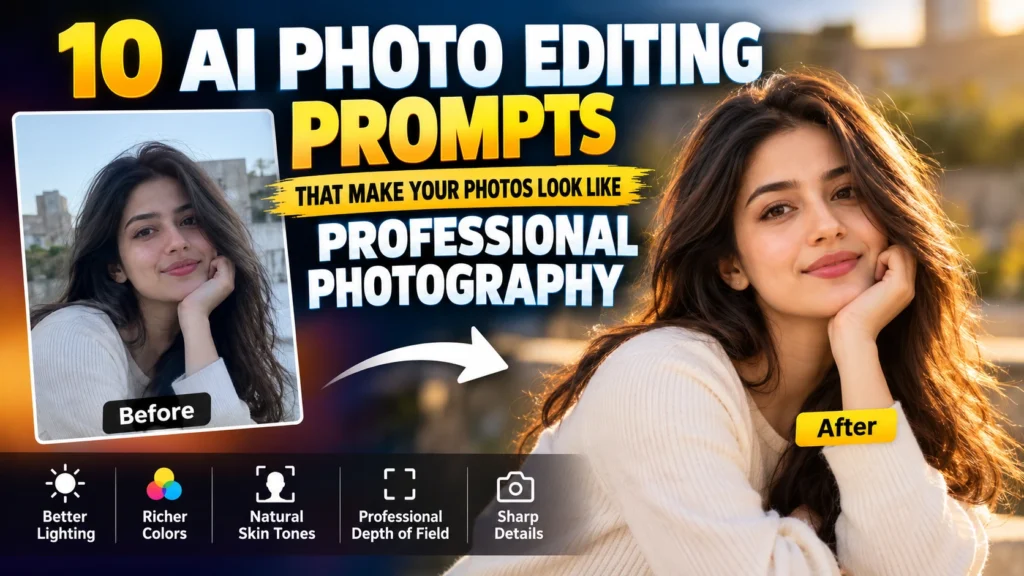
Golden-hour lighting can create warm highlights and attractive natural shadows in outdoor photographs.
Image caption: Golden-hour editing can create warm natural light and attractive outdoor portrait results.
Suggested ALT text: Golden hour outdoor portrait photography
Copy Prompt:
Enhance this outdoor photograph with beautiful natural golden-hour lighting. Create warm sunlight, soft highlights, realistic shadows, subtle rim lighting around the subject, and natural background separation. Improve exposure, dynamic range, color balance, and skin tones while preserving the original environment. Make the photograph look like it was captured by a professional outdoor photographer using a high-quality camera and portrait lens. Preserve facial identity, clothing, hairstyle, body proportions, and natural skin texture. Keep the final result realistic, warm, sharp, and photographic.Professional Studio Portrait Prompt
Turn a casual portrait into a studio-style photograph with controlled lighting.
Image caption: Studio photography uses controlled lighting to create clean highlights, shadows, and subject separation.
Suggested ALT text: Professional studio portrait with softbox lighting
Copy Prompt:
Transform this photograph into a professional studio portrait. Use softbox-style lighting from the front and slightly above the subject, with subtle fill light and realistic shadows. Improve exposure, skin tones, sharpness, contrast, and color accuracy. Create a clean professional background with natural depth and subtle separation from the subject. Preserve the person's exact facial identity, facial structure, hairstyle, clothing, body proportions, and natural skin texture. Remove minor visual distractions while keeping the photograph realistic. Avoid plastic skin, excessive retouching, artificial facial changes, and overprocessing.Professional Social Media Photo Prompt
Want to create a polished photograph for Instagram, Facebook, LinkedIn, or other social platforms?
Try this prompt.
Copy Prompt:
Enhance this photograph for a premium professional social media look. Improve composition, exposure, lighting, color grading, sharpness, skin tones, and background separation. Give the image a clean modern photography aesthetic similar to a professionally captured lifestyle portrait. Maintain realistic skin texture and natural facial features. Preserve the person's identity, clothing, hairstyle, and body proportions. Use subtle contrast, balanced colors, realistic highlights, and soft shadows. Keep the final photograph natural, sharp, clean, detailed, and visually appealing.Professional Black and White Portrait Prompt
Black and white photography can create a classic editorial appearance.
Copy Prompt:
Convert this portrait into a professional black and white photograph with a classic editorial photography aesthetic. Use carefully controlled highlights and shadows, strong but natural tonal separation, detailed skin texture, and realistic facial contrast. Create soft directional lighting with subtle shadows across the face. Preserve the person's exact facial identity, expression, hairstyle, clothing, and body proportions. Maintain realistic skin texture and fine details. Make the image look like it was captured using professional monochrome photography equipment. Avoid excessive contrast, artificial smoothing, crushed shadows, and loss of facial detail.Professional Night Photography Prompt
Low-light photographs often contain noise, poor exposure, and lost details. This prompt can help create a cleaner professional result.
Copy Prompt:
Enhance this night photograph using professional low-light photography techniques. Correct exposure while preserving the natural nighttime atmosphere. Reduce digital noise, improve sharpness, recover shadow details, control bright highlights, and maintain realistic colors. Add subtle cinematic lighting where appropriate without changing the original environment. Preserve the person's exact facial identity, clothing, hairstyle, body proportions, and natural skin texture. Keep realistic light sources, reflections, shadows, and background details. Avoid excessive brightness, fake lighting, oversaturation, extreme HDR, and artificial effects.Professional Photo Retouching Prompt
This is an all-purpose prompt for professional photo enhancement.
Copy Prompt:
Professionally retouch this photograph while keeping it completely realistic. Correct exposure, white balance, contrast, color grading, lighting, sharpness, and overall image quality. Improve skin appearance while preserving natural pores, texture, fine lines, and facial details. Remove only temporary blemishes and minor distractions. Enhance hair, eyes, clothing texture, and background details without changing the person's identity. Create natural depth of field, realistic lighting, balanced colors, and professional photographic detail. Make the final image look like it was captured and retouched by an experienced professional photographer. Do not change facial structure, body proportions, age, hairstyle, clothing design, or identity.Bonus Negative Prompt for Cleaner AI Edits
Some AI image editors can introduce unwanted changes such as distorted hands, unnatural skin, altered faces, or excessive sharpening.
Use this negative prompt when your AI editor supports negative instructions.
Copy Negative Prompt:
Do not change the person's identity, facial structure, face shape, eyes, nose, lips, teeth, hairstyle, age, body proportions, clothing design, or expression. Avoid plastic skin, excessive skin smoothing, unrealistic eyes, distorted hands, extra fingers, missing fingers, artificial facial features, oversharpening, excessive HDR, extreme saturation, unnatural skin tones, fake blur, excessive glow, cartoon effects, unrealistic lighting, duplicated objects, warped backgrounds, image artifacts, and low-resolution details.How to Get Better Results From AI Photo Editing
- Use a high-quality original photograph.
- Tell the AI exactly what you want to improve.
- Mention the lighting style you prefer.
- Ask the AI to preserve facial identity.
- Use realistic skin texture instructions.
- Avoid excessive retouching.
- Use the negative prompt when your AI editor supports it.
- Try different prompts with the same photograph and compare the results.
- You can also combine different instructions. For example, combine professional portrait lighting with cinematic color grading and natural DSLR depth of field.
- Why Professional-Looking AI Edits Need Realism
The goal of professional photo editing should be to improve the photograph without making the subject look artificial. A good edit should preserve:
- Natural facial features
- Realistic skin texture
- Accurate body proportions
- Natural lighting
- Original clothing
- Realistic hair details
- Natural shadows
- Fine photographic details
If an AI editor changes the person’s identity or makes the skin look like plastic, reduce the strength of the edit or add stronger preservation instructions to your prompt.
Final Thoughts
AI photo editing can make a major difference when you use precise instructions. The 10 prompts in this guide give you different ways to improve portraits, fashion photographs, cinematic images, studio portraits, outdoor photographs, night shots, and social media pictures.
Instead of simply asking an AI tool to “make my photo professional,” describe the lighting, camera style, colors, background, skin texture, depth of field, and details you want to preserve. Start with one prompt, review the result, and then make small adjustments.
The best AI photo edits usually come from a combination of a good original photograph and clear instructions. Save these prompts and try them with your favorite AI photo editing tool. PromptViz.online will continue to bring you practical AI prompts that you can copy, paste, and use in your own creative projects.
Frequently Asked Questions
Can I use these prompts with any AI photo editor?
You can use them with most AI editing tools that allow you to upload a photograph and describe the changes you want. Results can vary between different AI tools.
Will these prompts change my face?
The prompts specifically tell the AI to preserve your identity and facial features. For additional protection, include instructions such as “preserve exact facial identity” and “do not change facial structure.”
Can I use multiple prompts on one photograph?
Yes. Start with a general enhancement prompt and then experiment with a specific style such as cinematic, studio, fashion, or golden hour.
How can I make AI photo edits look realistic?
Use specific lighting instructions, request natural skin texture, avoid excessive retouching, and use the negative prompt to reduce unwanted changes.
Can I use these prompts for social media photos?
Yes. The professional portrait, cinematic, fashion, DSLR, and social media prompts work well for profile pictures and social media photographs.
Are these prompts suitable for beginners?
Yes. You do not need advanced photo editing skills. Upload your photograph, copy a prompt, paste it into your AI editor, and review the result.
Can I modify these prompts?
Yes. You can change the lighting, photography style, background, color grading, camera look, and other instructions according to the photograph you are editing.